
Scientific Calculator PRO
https://play.google.com/store/apps/details?id=com.grow.calculator.engineering&pcampaignid=web_share
Advanced Scientific & Engineering Calculator
Scientific Calculator 991-Style | Graph Plotter
| Algebra | Matrix | Statistics | Engineering Tools
Advanced Scientific & Engineering Calculator is a
powerful all-in-one calculator app designed for
students, engineers, teachers, and professionals
who need accurate and fast calculations on their
mobile device.
Whether you are preparing for JEE, NEET, GATE,
or university exams — or working on real
engineering problems — this app delivers
everything you need in one place.
Works fully offline with fast and precise results.
No internet connection required.
━━━━━━━━━━━━━━━━━━━━━━━━━━━
🔢 SCIENTIFIC CALCULATOR (991-STYLE)
━━━━━━━━━━━━━━━━━━━━━━━━━━━
This app brings the full power of a physical
scientific calculator 991 to your mobile device
with a clean, modern interface designed for
fast and comfortable use.
– Basic arithmetic (+, −, ×, ÷)
– Powers, roots and factorial calculations
– Trigonometric functions (sin, cos, tan)
– Inverse trigonometric (sin⁻¹, cos⁻¹, tan⁻¹)
– Logarithm (log) and natural log (ln)
– DEG and RAD angle modes with easy toggle
– Engineering notation (ENG format)
– Smart bracket handling with auto-close
– ANS recall for previous result
– Calculation history (last 50 calculations)
– Store and reuse variables (A, B, C, X, Y)
– 12 built-in physical constants
– High-precision floating point results
The SHIFT key unlocks a second layer of
functions on every key — just like a real
scientific calculator.
━━━━━━━━━━━━━━━━━━━━━━━━━━━
📈 GRAPH PLOTTER
━━━━━━━━━━━━━━━━━━━━━━━━━━━
Visualize any mathematical function with a
powerful built-in graph plotter that supports
three types of graphs.
Cartesian Graphs
Plot standard y = f(x) functions with full
zoom and pan support. Plot up to 4 functions
simultaneously in different colors and toggle
each one on or off independently.
Polar Graphs
Plot r = f(θ) equations for curves like Rose,
Cardioid, Archimedean Spiral and more. Perfect
for understanding curves in polar coordinates.
Parametric Graphs
Plot x(t) and y(t) equations with adjustable
t range. Includes example presets like Circle,
Spiral and Lissajous curves.
Additional Graph Features:
– Pinch to zoom and drag to pan
– Trace mode — tap graph to see exact x, y values
– Automatic intersection detection between curves
– Function value table (x and y pairs)
– Example presets for quick plotting
– Reset view with one tap
This graph plotter is ideal for students
studying functions, curves, coordinate geometry,
and mathematical analysis.
━━━━━━━━━━━━━━━━━━━━━━━━━━━
📊 ALGEBRA SOLVER
━━━━━━━━━━━━━━━━━━━━━━━━━━━
Solve polynomial equations of any degree
instantly with accurate results.
– Linear equations (ax + b = c)
– Quadratic equations (ax² + bx + c = 0)
– Cubic equations (ax³ + bx² + cx + d = 0)
– Quartic degree 4 polynomial equations
The quadratic solver handles real and complex
roots. The cubic and quartic solvers use the
Durand-Kerner numerical method for reliable
results across all coefficient combinations.
Results display real roots clearly and flag
complex roots when they occur. Perfect for
homework verification, exam preparation and
mathematical analysis.
━━━━━━━━━━━━━━━━━━━━━━━━━━━
∫ CALCULUS TOOLS
━━━━━━━━━━━━━━━━━━━━━━━━━━━
Perform numerical calculus operations on
common mathematical functions.
– Numerical derivatives using central difference
– Definite integrals using Simpson’s rule
– Supports sin(x), cos(x), x², log(x) and more
– Enter the function and point or range
– Instant accurate results
Useful for engineering mathematics, physics
problems, and university calculus courses.
━━━━━━━━━━━━━━━━━━━━━━━━━━━
🔢 COMPLEX NUMBERS
━━━━━━━━━━━━━━━━━━━━━━━━━━━
Work with complex numbers in rectangular
and polar form.
– Addition, subtraction, multiplication, division
– Magnitude calculation (|z|)
– Phase angle calculation (∠z)
– Polar representation (r∠θ)
– Conjugate operation (z*)
– Power operation (z²)
Enter real and imaginary parts separately and
perform any operation instantly. Results display
in rectangular form with clean formatting.
Essential for electrical engineering, signal
processing, control systems and advanced
mathematics.
━━━━━━━━━━━━━━━━━━━━━━━━━━━
🔄 BASE CONVERSION & BITWISE
━━━━━━━━━━━━━━━━━━━━━━━━━━━
Convert numbers between four number systems
instantly with a built-in digit keypad.
– Decimal (DEC)
– Binary (BIN)
– Octal (OCT)
– Hexadecimal (HEX)
Bitwise Operations:
– AND, OR, XOR, NOT
– Left shift (<<) and Right shift (>>)
The keypad automatically enables and disables
digits based on the selected base — so you
never enter invalid characters.
Perfect for computer science students,
programmers, and digital electronics courses.
━━━━━━━━━━━━━━━━━━━━━━━━━━━
🧮 MATRIX CALCULATOR
━━━━━━━━━━━━━━━━━━━━━━━━━━━
Perform matrix operations for linear algebra
and engineering mathematics.
– Matrix addition and subtraction
– Matrix multiplication
– Determinant calculation
Ideal for students studying linear algebra,
engineering mathematics, and computer graphics.
━━━━━━━━━━━━━━━━━━━━━━━━━━━
📉 STATISTICS CALCULATOR
━━━━━━━━━━━━━━━━━━━━━━━━━━━
Analyze datasets with built-in statistical
tools.
– Mean (average)
– Median
– Mode
– Variance
– Standard deviation
Enter any dataset and get all statistics
calculated instantly. Useful for data analysis,
research work, and statistics courses.
━━━━━━━━━━━━━━━━━━━━━━━━━━━
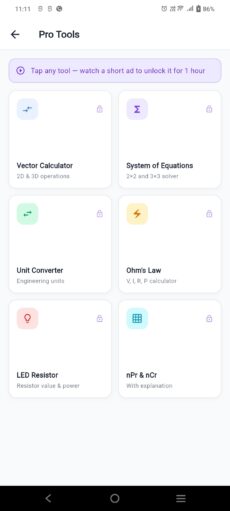
⚡ PRO ENGINEERING TOOLS
━━━━━━━━━━━━━━━━━━━━━━━━━━━
Unique engineering tools not found in typical
calculator apps. Designed specifically for
electronics, electrical, and mechanical
engineering students and professionals.
🔌 Ohm’s Law Calculator
Enter any two values from Voltage (V),
Current (I), Resistance (R) and Power (P).
The app instantly calculates the remaining
two values. Clear All button for quick reset.
Essential for every electronics student.
💡 LED Resistor Calculator
Select your LED type (Red, Yellow, Green,
Blue, White, UV, IR), enter supply voltage
and forward current. The app calculates:
– Required resistor value
– Nearest E24 standard resistor
– Power rating and circuit description
Saves time during circuit design and
electronics lab work.
📐 Vector Calculator (3D)
Perform 3D vector operations:
– Vector addition and subtraction
– Dot product (scalar result)
– Cross product (vector result)
– Magnitude of vector A and B
– Unit vector calculation
– Angle between two vectors
Useful for physics, mechanical engineering
and computer graphics.
🔢 System of Equations
Solve linear systems using Gaussian
elimination with partial pivoting:
– 2×2 systems (2 equations, 2 unknowns)
– 3×3 systems (3 equations, 3 unknowns)
Toggle between 2×2 and 3×3 with one tap.
🔄 Unit Converter
Convert between units across 18 categories:
Length, Mass, Temperature, Pressure, Energy,
Power, Speed, Area, Volume, Frequency,
Voltage, Current, Resistance, Capacitance,
Inductance, Data Storage, Angle and Time.
Clean dropdown with emoji category icons
and instant swap between from/to units.
🎲 Permutation & Combination (nPr & nCr)
Calculate permutations and combinations
with full step-by-step working shown:
– P(n, r) = n! / (n−r)!
– C(n, r) = n! / (r! × (n−r)!)
Includes explanation cards explaining when
to use permutation vs combination.
Uses BigInt for exact large number results.
━━━━━━━━━━━━━━━━━━━━━━━━━━━
🎓 PERFECT FOR
━━━━━━━━━━━━━━━━━━━━━━━━━━━
This app is built for:
– Engineering students
ECE, EEE, Mechanical, Civil,
Computer Science
– JEE / NEET / GATE exam preparation
– BSc and MSc in Mathematics and Physics
– Electronics hobbyists and circuit builders
– School and college students
– Teachers and academic professionals
– Anyone who needs a reliable scientific
calculator on their phone
━━━━━━━━━━━━━━━━━━━━━━━━━━━
💎 PREMIUM SUBSCRIPTION
━━━━━━━━━━━━━━━━━━━━━━━━━━━
Upgrade to Premium for the best experience:
– Remove all ads completely
– Unlock all advanced features instantly
– Affordable yearly subscription price
Free users can unlock individual PRO tools
by watching a short rewarded ad — no forced
subscription required.
━━━━━━━━━━━━━━━━━━━━━━━━━━━
❓ FREQUENTLY ASKED QUESTIONS
━━━━━━━━━━━━━━━━━━━━━━━━━━━
Does it work offline?
Yes. All calculations work completely offline.
No internet connection is required.
Is it similar to a Casio 991 calculator?
Yes. It includes all 991-style scientific
functions plus many advanced tools that are
not available on physical calculators.
Can I remove ads?
Yes. Upgrade to the premium subscription
to remove all ads permanently.
Is it suitable for engineering students?
Yes. It includes calculus, graphs, matrices,
vectors, Ohm’s Law, LED resistor calculator
and many other engineering-specific tools.
Does it support complex numbers?
Yes. Full complex number arithmetic in both
rectangular and polar form is supported.
━━━━━━━━━━━━━━━━━━━━━━━━━━━
🔒 PRIVACY & SAFETY
━━━━━━━━━━━━━━━━━━━━━━━━━━━
– No personal data collected by the app
– All calculations processed locally on device
– Works fully offline
– No login or account required
Privacy Policy:
Privacy Policy
❗ DISCLAIMER
This app is not affiliated with or endorsed
by any physical calculator brand. The term
scientific calculator 991 is used only to
describe the type and level of functionality
this app provides.
📥 Download now and experience the most
complete scientific and engineering calculator
available on Android — built for modern
students and professionals!